Jamf Reports 2.9.0: Define Your Own Security Score and Stale Rules
Jamf Reports 2.9.0 adds a Security Score you define, a stale rule built on your own dates, and a check for Macs MDM can reach but the Jamf binary can't.
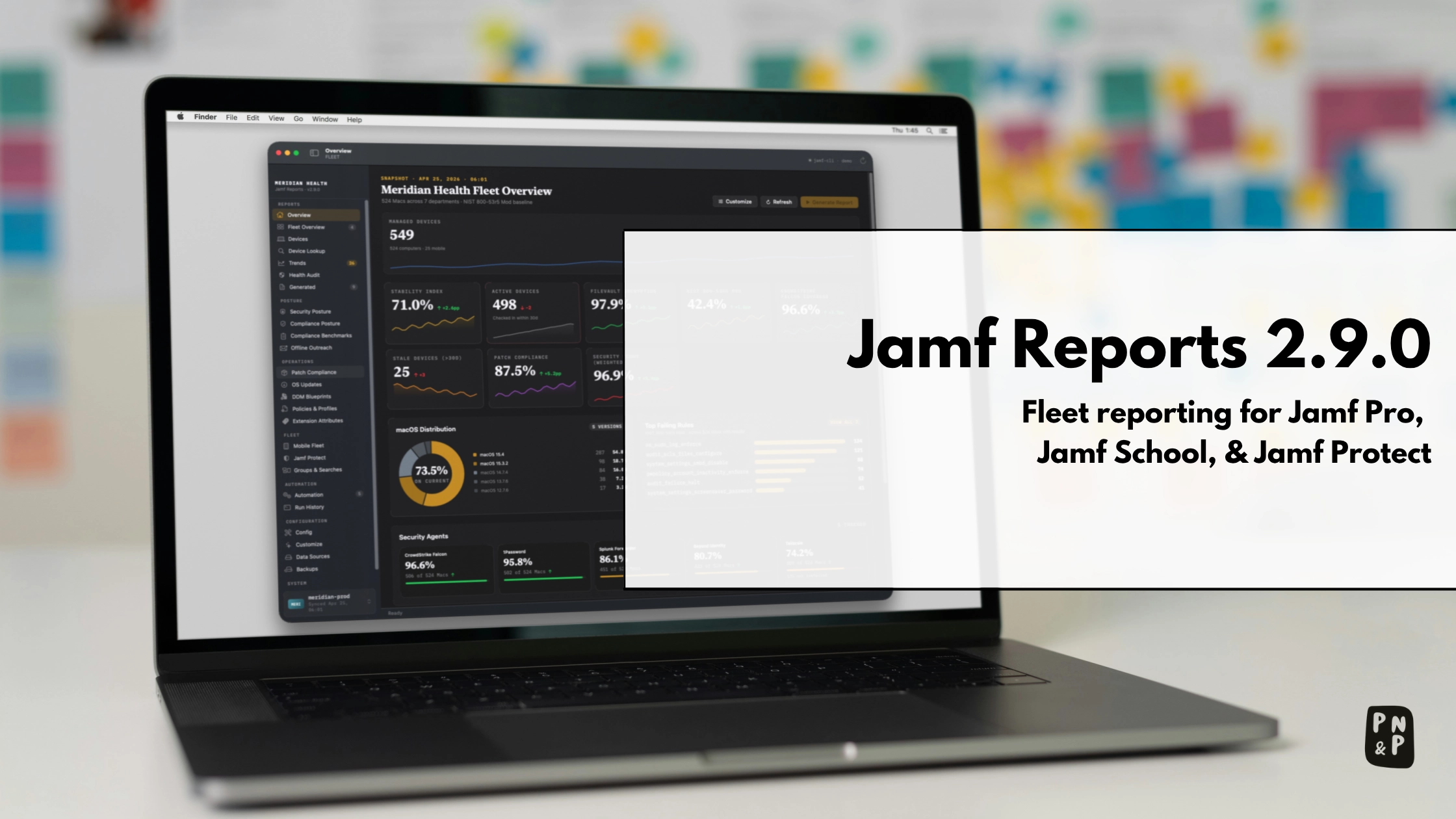
Jamf Reports 2.9.0 is out. It’s a big release, and its theme is that the app stops deciding for you how your fleet is judged. You choose what the Security Score counts, what makes a Mac stale, and which security settings are failures. The numbers now match from screen to report, and the HTML report is shorter.
Jamf Reports is a free, open-source (MIT) native macOS app that builds historical fleet reports from Jamf Pro. If you’re new to it, read on for what it is and why it exists, and skip to Getting Started when you’re ready to try it. You can even look around in demo mode before you connect a Jamf server. If you’re running 2.8.x, go straight to Upgrading from 2.8.x.
I’m borrowing that habit from Dan K. Snelson, someone I look up to a great deal in the Mac Admins space. So, with that, I intend to ensure I have a post with every new release.
Why I Built This
Jamf Pro has historically shown every Mac as of its last inventory date. It doesn’t keep a fleet-level history for you, so “how many Macs had FileVault on last month compared to this month?” has no answer inside Jamf Pro itself. That’s why I built the scripting stack I wrote about when rebuilding my reporting stack back in April. Back then it was a Python script driven by a LaunchAgent.
Since then, more admins have told me they need the same thing, and jamf-cli gave me a clean way to collect the data. So on May 20, Jamf Reports was released as a native macOS app (2.0.0), and fourteen releases later, here’s 2.9.0.
Overview
Jamf Reports builds fleet reports against the Jamf Platform (Pro, School, Protect, and the Platform API). It’s for Mac Admins who need historical reports that leadership will actually read, without building a pipeline of mailbox rules and flows to produce them.
- It collects with
jamf-cli, Jamf’s open-source command-line tool, or reads a Jamf Pro CSV export or cached snapshots. A “collect” is one pull of fleet data. The app never stores your API credentials.jamf-clikeeps them in the macOS Keychain or its own config file. - It keeps history. A daily summary feeds Historical Trends and the period reports, which is the part Jamf Pro itself doesn’t do.
- It writes the reports you hand to people: multi-sheet Excel workbooks, a self-contained HTML report, PDF, and CSV.
- Beyond the fleet overview, it has screens for security posture, compliance benchmarks, patch compliance, OS updates, DDM blueprints, policies and profiles, extension attributes, mobile devices, and groups.
- It runs unattended from one background item. You set an automation policy instead of writing cron jobs. Run History shows each run, and a dead-man switch tells you when a schedule stops running.
- It’s driven by
config.yaml. You map your own extension attributes and columns with no code changes. Each Jamf Pro profile gets its own workspace folder, such as~/Jamf-Reports/meridian-prod/config.yaml. Edit the file in the app or by hand. Config Doctor names keys the app doesn’t read and suggests the one you probably meant, and a save from the app keeps your comments. - The same binary includes a
jamf-reportscommand-line tool for scripted collects, reports, and checks. - On macOS Golden Gate 27 there are optional on-device insights, using Apple’s Foundation Models on the Mac. They’re off until you turn them on.
You need macOS Sequoia 15 or later on Apple silicon (Intel Macs can build from source), jamf-cli 1.18.0 or later, and a Jamf Pro API client with read privileges. It works against Jamf Pro on-premises or Jamf Cloud.
Note: Your data stays on the Mac.
jamf-clitalks to your Jamf servers. Apart from that, the app contacts only the SOFA feed for macOS and XProtect release dates, which you can turn off. Webhook cards go out only if you configure them, and they carry totals, never device rows.
Note: I run an on-premises Jamf Pro server and turn on most of what it offers. I don’t have access to cloud-only features like the Jamf Platform API and Blueprints, and I don’t use Jamf Connect, Jamf Protect, or Jamf Security Cloud, so those areas get less testing from me. If something looks wrong there, open an issue.
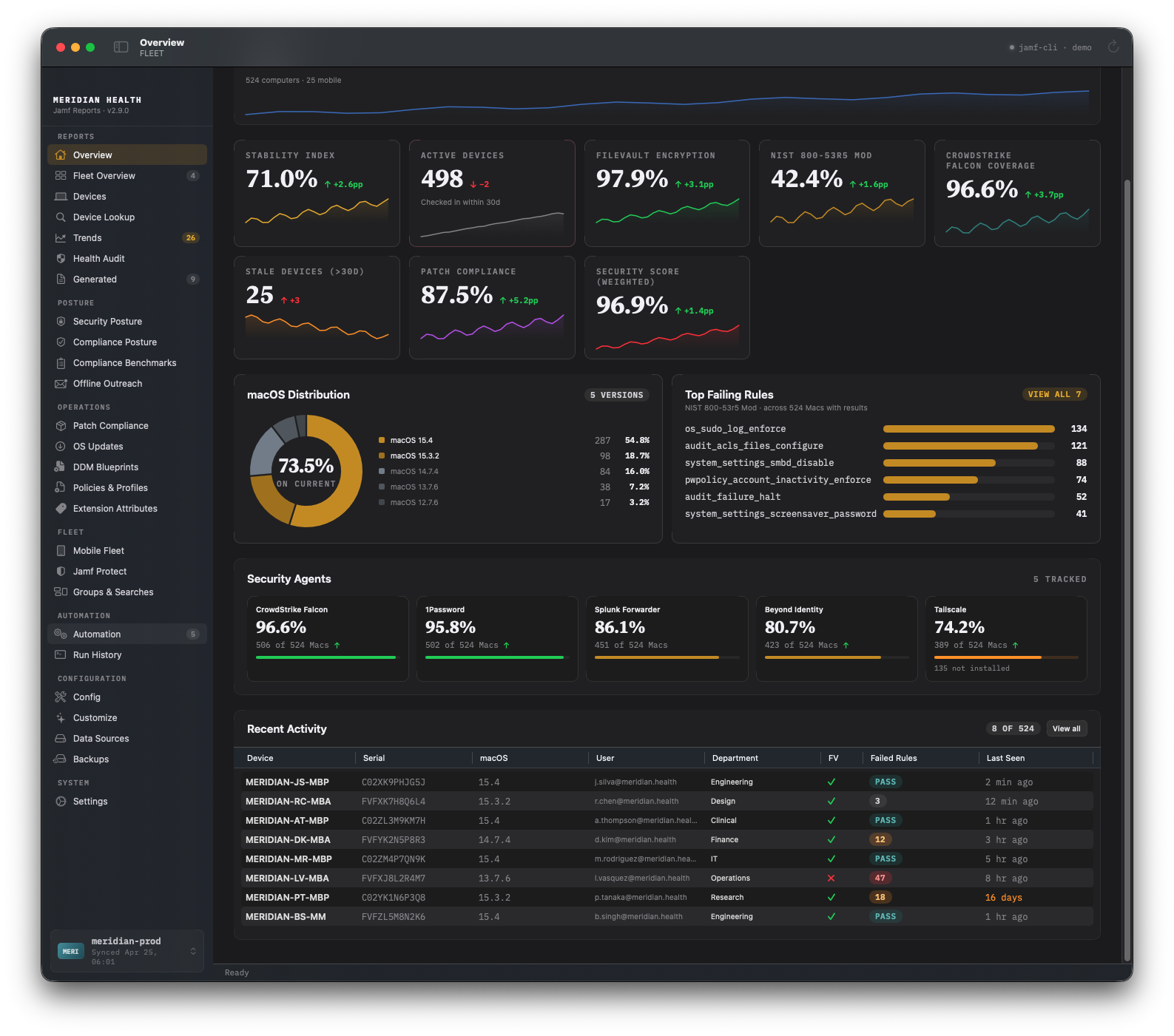 The Overview screen. Every screenshot in this post comes from the app’s demo mode, a fictional organization, not a real server.
What’s New in 2.9.0
The release notes group the changes by theme, and the CHANGELOG lists all of them. The short version:
- You define the Security Score. Add or remove factors and set weights, including one factor per security agent such as CrowdStrike.
- FileVault, SIP, Firewall, and Gatekeeper can each be a failure, a warning, or not counted.
- You choose which dates make a Mac stale.
- A new contact gap check finds Macs that MDM can reach while the Jamf binary has gone quiet.
- Generate… on the Reports screen builds the report you want, and the HTML report is shorter and embeds
jamf-cli’s fleet dashboard (jamf-cli1.31.0 or later). - Patch compliance is one figure everywhere, and two Macs that share a computer name count as two Macs.
- Collects and reports never overlap.
Upgrading from 2.8.x
Download the .pkg or the .dmg from the releases page and install it. There’s nothing to migrate. Your 2.8 settings carry over, and a few figures can shift on your first collect:
- Security Score: you keep your 2.8 weights until you edit the factor list, so the score doesn’t move on its own. When you do edit it, the Overview marks the old and new scores as not comparable, and Trends measures from that day.
- Stale count: with nothing set, stale still means last check-in only. The only Macs that change category are those sitting exactly at the threshold, because stale now means more than N days.
- Device counts: two Macs that share a computer name now count as two Macs, so a total can go up.
- Patch compliance: Trends recalculates earlier days under the one definition where the daily patch snapshots exist.
- Command line:
jamf-reports collect,generate,html, andbackupexit75when the app or a scheduled run is collecting or writing a report.
Warning: If a Jamf policy or LaunchAgent calls
jamf-reports, it can now get a nonzero exit when another collect is running. Exit75means “busy, try again”, not “failed”. A simple retry covers it:
1
2
3
4
5
jamf-reports collect --profile prod; rc=$?
if (( rc == 75 )); then
  sleep 300
  jamf-reports collect --profile prod
fi
A Security Score You Define
Up to 2.8, the Security Score was eight fixed weights. Three of them (XProtect, CVE, and Secure Boot) often had no data behind them, and dropping a factor meant typing a zero.
In 2.9.0, the score is a list of factors you choose. Config › Scoring shows each factor with today’s share of passing Macs, its part of the score, and a weight. You can remove a factor or add one from a menu, and “Use defaults” puts the list back. A new workspace starts with a default list that counts what Jamf Pro already reports, plus macOS and XProtect currency with a grace period after each Apple release. If you’re upgrading, your 2.8 weights stay as they are until you edit the list. The list is saved to the workspace’s config.yaml, so Security Posture, the Overview, Trends, alerts, and reports all score the same way. Here’s an example list:
1
2
3
4
5
6
7
8
9
10
11
12
13
14
15
16
17
18
security_policy:
  score_factors:
    - factor: filevault
      weight: 15
    - factor: sip
      weight: 10
    - factor: os_current        # newest release of the Mac's major version...
      weight: 15
      grace_days: 30            # ...that came out at least 30 days ago (SOFA)
    - factor: xprotect_current
      weight: 5
    - factor: patch_compliance
      weight: 10
    - factor: checked_in
      weight: 5
    - factor: agent
      agent: "CrowdStrike Falcon"
      weight: 5
Tip: Weights don’t need to add up to 100. A factor with no data drops out and the rest are rescaled, so a server without a given agent or baseline still gets a fair score.
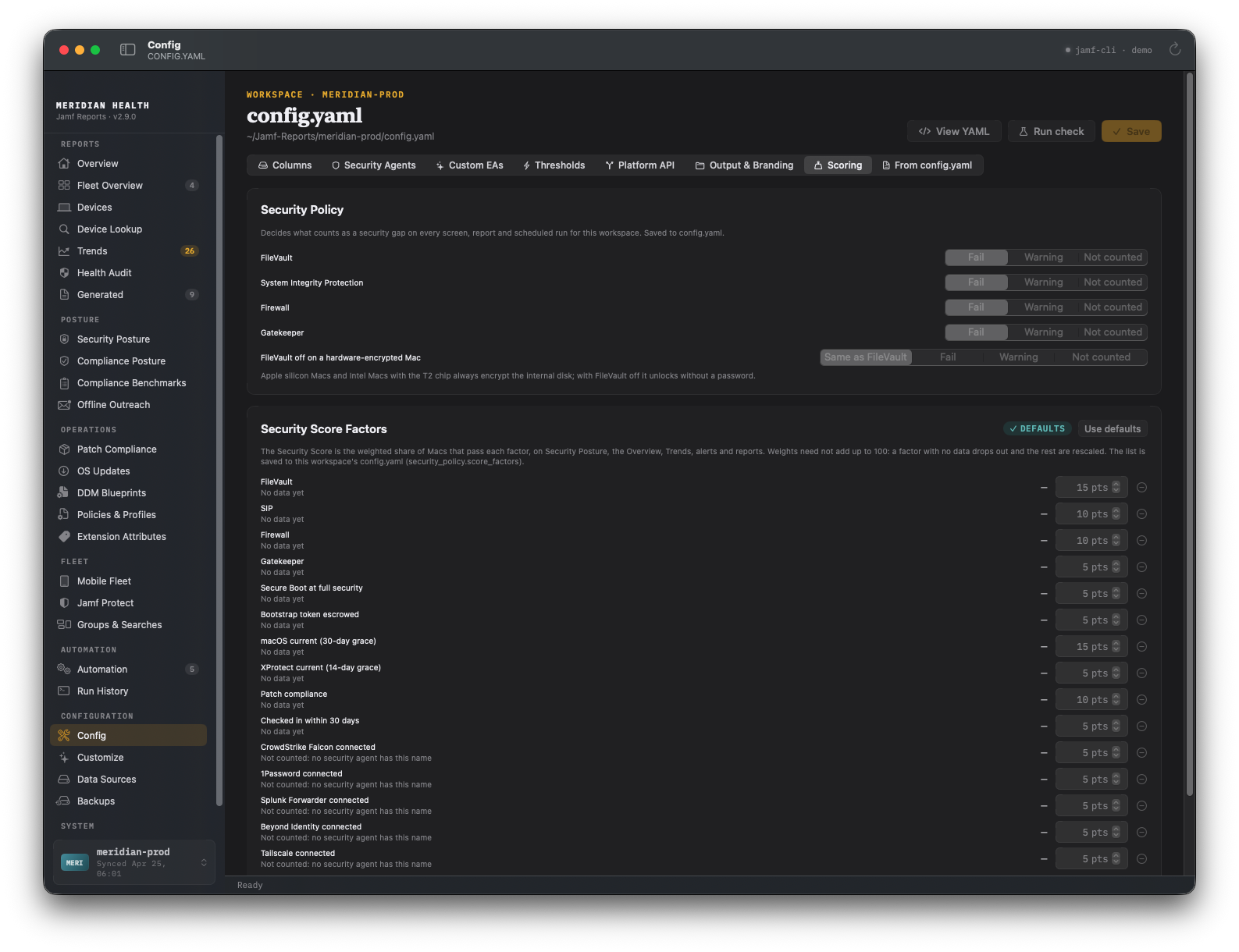 Config › Scoring: the security policy on top, the score factors below.
Changing the definition changes the number, so 2.9.0 says so. On the day the factors or weights change, the Overview tells you the old and new scores are not comparable. Trends measures from that day, and a “drops more than” alert skips the comparison. Without that, a policy edit would page you like a fleet regression.
Security Policy: Fail, Warning, or Not Counted
This one started with FileVault on Apple silicon. An Apple silicon Mac, or an Intel Mac with a T2 chip, always encrypts its internal disk. With FileVault off, though, the disk unlocks without a password. Jamf reports those Macs as not encrypted. For some organizations, that’s a warning at most. For others, a baseline requires FileVault on, and anything less is a failure. The app shouldn’t decide that for you.
1
2
3
4
5
6
7
security_policy:
  controls:
    filevault: fail        # fail | warning | ignore
    sip: fail
    firewall: fail
    gatekeeper: warning
  filevault_off_hardware_encrypted: warning
The policy applies on every screen, in every report, and in scheduled runs. If your extension attribute says Pass/Fail or Compliant/Non-Compliant, list those words under on_values and off_values and the app reads them correctly. A Mac that didn’t report a setting shows as “not reported”, never as a failure.
Stale Is Yours to Define
“Stale” used to mean “no check-in for N days”, and different screens didn’t even agree on whether exactly N counted. In 2.9.0, a Mac is stale when it is more than stale_device_days old, on every screen and in every report. You decide which dates count:
1
2
3
4
thresholds:
  stale_device_days: 30
  stale_basis: [check_in, inventory]   # check_in | inventory | contact
  contact_gap_days: 14
[check_in, inventory] reads as “not checking in, or not submitting inventory, for more than 30 days”. If you set nothing, it stays last check-in only, so a Mac only changes category if it sits exactly at the threshold.
The Contact Gap
Jamf Pro 11.30 added Last Contact: the last time the Mac talked to Jamf Pro by any route, whether the Jamf binary, MDM, or declarative device management. Put that next to Last Check-in and Last Inventory Update, and you can see something the old fields hid:
- Jamf binary silent. Last Contact is current, but the last check-in is more than
contact_gap_daysbehind it. MDM can reach the Mac, but the binary isn’t checking in. It may be broken, removed, or blocked. - Inventory not updating. The Mac checks in, but its inventory lags behind its contact.
Both show up in the Health Audit, as a filter on Devices, in the workbook’s Check-in Health sheet, and under “Needs attention” in the HTML report.
Note: This needs Jamf Pro 11.30 or later. On an older server, which in practice means an on-premises one,
jamf-clican’t return Last Contact, so the contact gap and thecontactstale basis have nothing to work with.
Tip: A Mac in the “Jamf binary silent” list is where I’d start looking. These five commands, run on that Mac, narrow it down.
1
2
3
4
5
ls -l /usr/local/bin/jamf             # is the binary still installed?
sudo jamf checkJSSConnection          # can the binary reach Jamf Pro?
sudo launchctl list | grep -i jamf    # are the Jamf launch daemons loaded?
sudo jamf policy                      # force a check-in
sudo jamf recon                       # force an inventory update
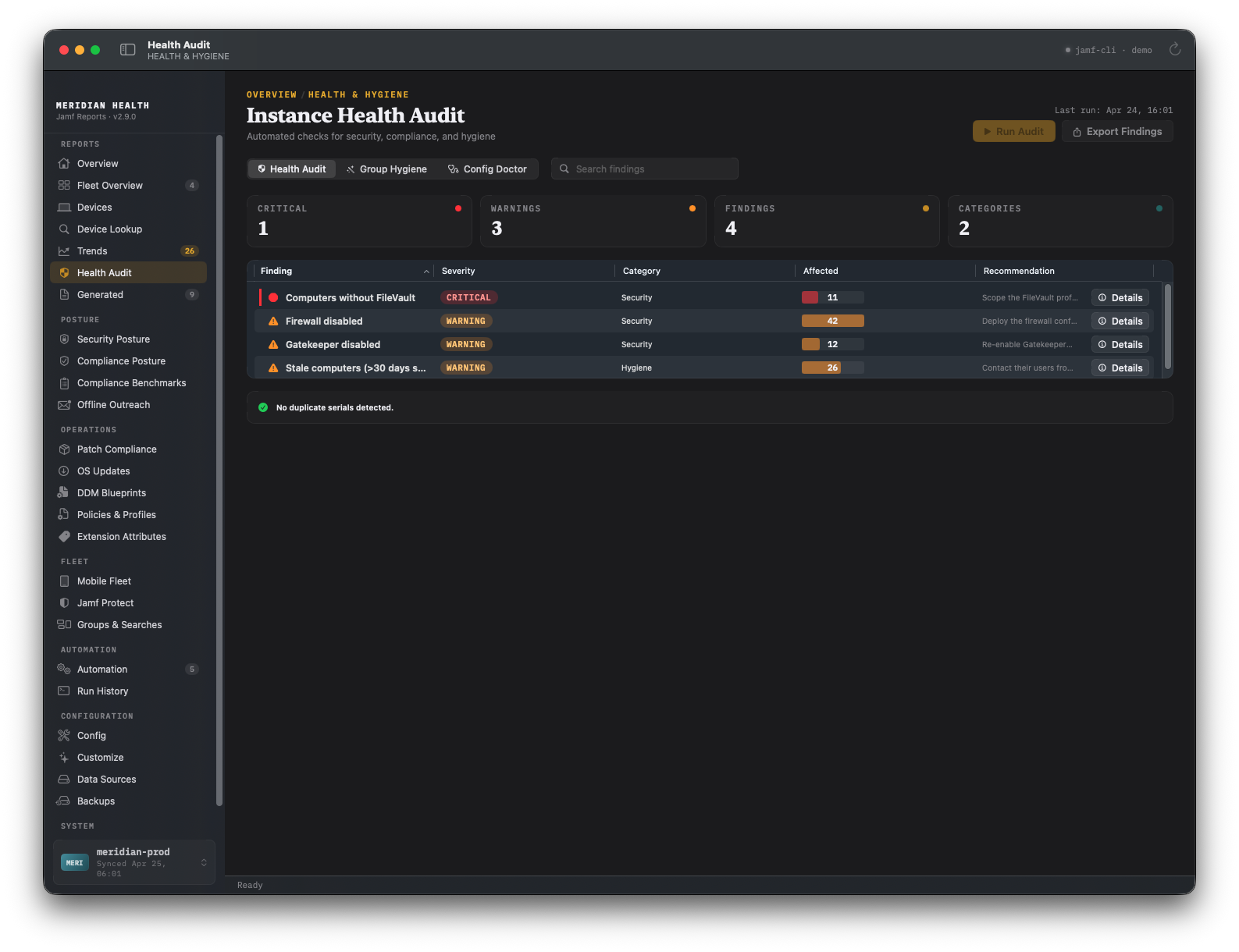 The Health Audit screen. The demo workspace has no contact gap findings, so you only see the existing checks here.
Generate and the Shorter HTML Report
Generate… on the Reports screen opens a sheet. You pick a template or your own set of sheets, then XLSX, HTML, PDF, or CSV, then whether to collect fresh data first and whether to run a Health Audit first. The live log lists every file it wrote, with a SHA-256.
The HTML report got shorter. It opens with a header and a handful of figures with their change over the week. Next comes a “Needs attention” list that links into the report, then the jamf-cli fleet dashboard, then collapsed sections with an audit appendix at the end. Full device lists stay in the workbook, because the HTML report is the file that gets forwarded. PDF exports now hold the whole report with its colors, not just the first page.
Getting Started
Requirements
- macOS Sequoia 15 or later on Apple Silicon. Intel Macs can build from source.
jamf-cli1.18.0 or later. The fleet dashboard needs 1.31.0.- A Jamf Pro API client with read privileges. The Permissions and Access wiki page lists them.
Try Demo Mode First
If the app hasn’t been set up yet, the first launch lets you turn on demo mode. It loads a fictional organization, so you can look around without a Jamf server or jamf-cli. You can also switch demo mode on manually at any time, even after you’ve configured the app. It’s where every screenshot in this post comes from.
Install
- Install
jamf-cliand add a profile for your Jamf Pro server. - Download
JamfReports-2.9.0.pkg(or the.dmg) from the release page. The app is signed with an Apple Developer ID issued in my own name, not a company’s. - Open JamfReports. Setup finds your
jamf-cliprofiles, or walks you through adding one, and runs a first collection. - Open Reports › Generate… and make your first report.
- Optional: turn on automation. Open Automation, set the policy, and allow JamfReports under Login Items when macOS asks.
Optional: install the command-line tool. Go to Settings › Command-line tool › Install command-line tool, then run:
1
2
3
 jamf-reports check --profile <name>
 jamf-reports collect --profile <name>
 jamf-reports generate --profile <name>
Note: If you work from a Jamf Pro CSV export instead of
jamf-cli, Config › Columns maps your CSV headers to the fields the app expects, and its validation panel flags what’s missing.
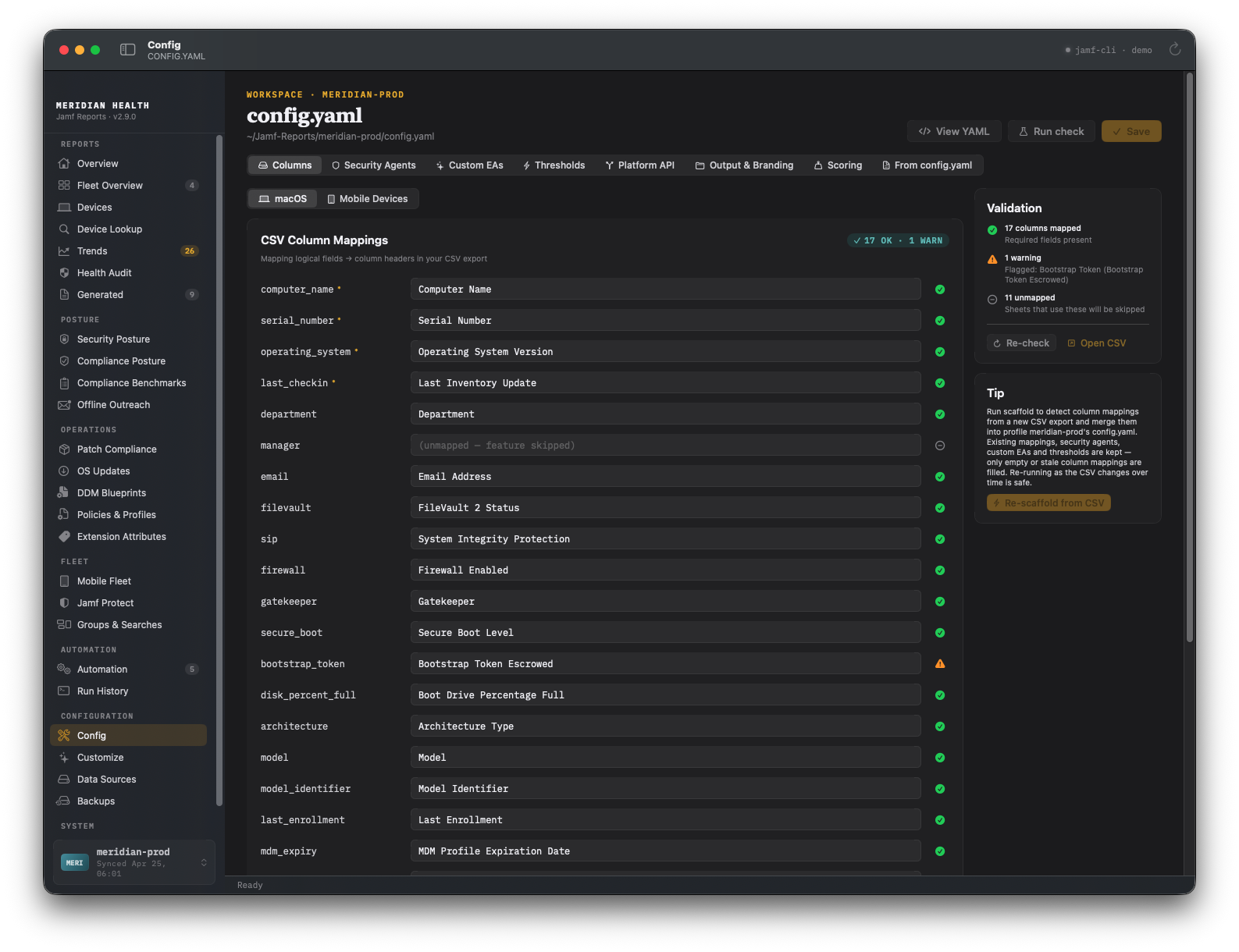 Config › Columns, with the validation panel on the right.
Verification
- Run History shows the collection as “Manual collect” and lists any source that didn’t land, with the reason.
jamf-reports check --profile <name>lists every config, data-accuracy, and workspace finding, with a fix for each.- Config › Scoring shows each factor with today’s share of passing Macs, and Security Posture names any factor that has no data yet.
Warning: “A refresh is already running” or “A report is being generated” isn’t a failure. The app runs one collect or report at a time, so wait for the current one to finish. From the command line, the same situation exits
75.
Resources
- Release notes: v2.9.0, and all releases
- Full change list: CHANGELOG
- Wiki: Configuration and Templates, Security and Operational Considerations, Diagnostics and Troubleshooting
jamf-cli: concepts.jamf.com/concepts/jamf-cli- SOFA: sofa.macadmins.io
Support
If something breaks, or a number doesn’t match what you see in Jamf Pro, open an issue on GitHub.
Why It’s Been Quiet
It’s been quiet around here since May. I spent most of my personal time on this app and general Mac Admins Community work, like making sure I remain up to date with our migration to Slack Enterprise Grid.
Thanks to the team behind jamf-cli at Jamf Concepts, the Mac Admins Open Source community, and Dan K. Snelson, whose release posts I borrowed the format from.