My Reporting Stack, Rebuilt
Rebuilding my internal reporting workflow from a 10,000-line internal script and chain of mailbox automations to jamf-cli and jamf-reports-community.
I work in a space that loves reporting. If it can go on a chart, someone wants it. And while Jamf Pro can generate and email CSV reports based on searches, those reports rarely have the polish that makes leadership actually pay attention.
For the last two years as a government contractor, my Jamf Pro reporting followed the same pattern: solve one problem, automate it, keep building. What started as smaller Python scripts for mSCP trends, compliance counts, and super reporting eventually became one larger internal script that handled most of my reporting needs. It worked. Patch compliance, macOS adoption charts, security posture workbooks, STIG trending, vulnerability mail merges. A lot came out of that one file.
But the workflow around it had gotten messy.
It depended on scheduled emails, Power Automate flows, SharePoint folders, and environment-specific logic scattered through the code. If anything broke—a mailbox rule, a Power Automate flow, a file landing in the wrong folder—the whole thing stopped. And I knew that if I left or got hit by a bus, the entire reporting pipeline would collapse the moment those Power Automate flows stopped running.
Over the past few weeks, I’ve started replacing that with jamf-cli (https://concepts.jamf.com/concepts/jamf-cli/) for data collection and with a new open-source project, Jamf Reports (Community), for the actual report generation. I’m still running both in parallel, validating the new approach against what I already rely on. That’s not done yet, but the direction is clear.
This Did Not Start as One Script
The internal script I’m replacing wasn’t supposed to be a single giant reporting tool. It just became one.
Over two years, I built smaller scripts for specific reporting problems. Some of those turned into blog posts. I wrote about mSCP trend reports, improving those workflows, super reporting in Jamf, and counting failed compliance findings by severity. Each addressed a real operational need. Eventually, maintaining separate utilities no longer made sense, so I merged them into a single Python file. One place to run from, one place to update, one file that kept expanding.
One script to rule them all.
1
2
3
4
5
6
7
8
9
10
11
12
13
14
15
16
17
18
19
20
21
22
% python3 jamf_reports_cli_v3.5.py
================================================================================
  Jamf Reports CLI - Unified Fleet Management Reporting Tool
  Version 3.5.0 - Enterprise Fleet Management Edition
================================================================================

MAIN MENU
----------------------------------------
1. Generate Patch Management Report (Jamf Pro)
2. Generate Configuration Compliance Report (Historical Trends + Charts)
3. Generate macOS Adoption Report (Version Tracking + Chart)
4. Generate Vulnerability Mail Merge (Standard)
5. Generate Vulnerability Mail Merge (Known Exploits)
6. Generate Vulnerability Mail Merge (Custom)
7. Generate Fleet Health Dashboard
8. Export Existing Report (PDF/PowerPoint)
9. Weekly Teams Alert (All Reports)
10. Configure Settings
11. mSCP Compliance Deep-Dive Analysis
12. Exit

Select an option (1-12):
This iteration of my internal scripting made things easier in the short term. It also created a tool increasingly tied to my environment, my naming conventions, my assumptions. After a while, that becomes a ceiling. By the time I finalized everything, my script had run over 10,000 lines.
The Reporting Stack I Was Actually Replacing
When I say I’m replacing this workflow, I don’t just mean one Python script; I mean the entire chain.
The old way depended on Jamf Pro sending CSV reports to my work email. Power Automate picks them up, extracts attachments, and dumps them into a dedicated SharePoint repository. A second Power Automate flow moves those files into subfolders based on report type. My internal script then runs against those staged files and generates the outputs I actually need.
It works. It’s still working. In some ways, it’s clever – personal opinion, of course. It let me do reporting without building everything from scratch or hammering the Jamf API. It also lets me accumulate historical data and reuse it for trending. That part was genuinely valuable.
But the weak points were obvious. If Jamf fails to send an email, the pipeline breaks. If a Power Automate flow has an issue, it breaks. If a file lands in the wrong place or doesn’t get moved, it breaks. And the internal script itself had accumulated layers of organization-specific knowledge: extension attribute names, column assumptions, department mappings, thresholds, and exceptions that only make sense in my environment. And now additional reporting flows are being built centered around the current flow. I realized I have no backup, and I’m the primary, sole person generating all of this vast trend data for the Mac Platform.
It was effective, but tightly coupled to everything around it, and to me.
Why This Needed to Change
A few reasons pushed me.
First was security. The old script still had API credentials hardcoded at the top. I was the only one using it, so it wasn’t urgent, but moving to environment variables had been on my to-do list forever. Like a lot of internal tooling, it got deferred because the script still worked, and I had more immediate things to do.
Second was transport. Email became part of my reporting dependencies. That’s fine by itself, and it was a situation of “this is how reports were sent before I got here,” but it’s not a foundation I wanted to keep building on for anything broader.
Third was organizational change. New processes are actively being put into place to take my current reporting and make it more widely available in the organization. I realized I have not trained anyone else on my team on how to generate this reporting if I’m out on PTO, or how to recreate the entire process in the event of a disaster recovery. Although I do have a decent document on a shared wiki, I’ve never run anyone through it.
Fourth was the reusability problem. By the time I looked at what the script had become, I could see useful reporting logic in there that could help other Jamf Admins. But everything was so embedded in my own environment that I couldn’t realistically share it without gutting and redesigning the whole thing. How could I have a wonderful tool that I couldn’t use in my efforts to give back to the community that has given so much to me?
The real issue wasn’t just one file’s technical debt. It was that the entire workflow had grown up around assumptions that made sense for my environment, but were too brittle and too specific to keep scaling.
What jamf-cli Changed
The tool that made this transition practical was jamf-cli from the Jamf Concepts.
See Neil Martin’s LinkedIn Post about various ways you could use this tool.
I saw the benefit of this tool immediately to my long-term goals, leading my team into the future of device management and endpoint security. So my intention is to use this tool not only to improve my current workflows and enhance internal platform reporting, but also to use it as a stepping stone to get my larger team comfortable with CLI tools and the idea of infrastructure as code – at least that’s the long-term goal. One step at a time.
The first thing that stood out was authentication. Instead of storing credentials in scripts and handling OAuth tokens myself, I could authenticate once and let macOS handle the tokens. That’s a real improvement over how my older setup had evolved.
More importantly, jamf-cli gives structured JSON output that I can cache locally and read repeatedly without constantly hitting the Jamf Pro API. On an on-premise Jamf instance, that matters. Reducing unnecessary API load isn’t just a performance preference. It’s about being realistic about your infrastructure’s constraints.
The report and overview commands available through the CLI provided a much cleaner data-collection layer. Instead of waiting for emailed CSVs to arrive and then shuffling them around, I could start collecting data on my own schedule. This is vitally important, as one hard requirement of reporting is the ability to maintain a historical log of snapshots, beyond just building trending reports.
That shift opened the door to rebuilding the rest of it.
I posted on LinkedIn about how quickly jamf-cli has been evolving, and Neil Martin replied with some useful context:
“Though I can’t take the original credit for coming up with jamf-cli; it was Keaton Svoma. I’ve just been lucky enough to get involved early and work closely on it. It’s been a fast paced and fun adventure for all… The pace is insane.”
I saw that pace in my own testing. The project felt well enough built to actually build around rather than just experiment with.
What the New Flow Looks Like
The new stack tries for a cleaner separation of concerns and responsibility.
At the collection layer, I use a LaunchAgent-driven shell script (collect.zsh) that runs on schedule and pulls data from Jamf Pro through jamf-cli. It writes timestamped JSON snapshots into a local jamf-cli-data/ directory. Lighter reports collect daily; heavier ones collect less frequently, depending on API impact and whether the data actually changes often enough to matter.
That gives me a local cache of reporting data I control directly.
At the reporting layer, I built jamf-reports-community. It reads cached jamf-cli JSON, combines that with CSV-based data sources where needed, and generates Excel workbooks and HTML reports. Right now, it’s built around Jamf Pro and Jamf School environments. Jamf Protect reporting is include, but experimental,l as I do not have a Protect tenant to validate against. If you need that and want to help build it, I’m open to PRs and contributions. The goal is to keep the reporting logic reusable and configuration-driven, rather than hardcoding it for a single environment. This is what I use to build my historical reporting as well, once the cache gets cycled and archived.
Instead of embedding assumptions directly into code, I moved configuration into YAML. Column names, security agent definitions, compliance thresholds, and output locations. Those can be adjusted without touching the reporting logic itself. That’s a much better foundation if the goal is adaptability across different Jamf environments. It also allows others who may want to use this script to customize it.
Then there’s the internal layer. Some workflows are too organization-specific to belong in a public project. For me, that includes vulnerability mail merges, deeper mSCP-specific internal workflows, and reporting that depends on internal naming conventions or internal source data. Those pieces stay in a separate internal script rather than getting mixed back into the community tool. That boundary is intentional.
What Belongs in Open Source, and What Does Not
This was probably the most important design decision in the rebuild.
The question wasn’t just “What can I publish?” It was “What is actually generic enough that someone else could use it?”
A patch compliance report is generic. Every Jamf shop needs to know which devices are behind on software titles. The exact columns may differ. The thresholds may differ. The output format may differ. But the underlying need is shared.
That belongs in an open source project.
A vulnerability mail merge that reads a very specific internal report format, enriches it with local inventory data, and produces output designed for one organization’s workflow is not generic. That stays internal.
The practical rule I settled on: if another Mac admin could point the tool at their own configuration and data and reasonably expect it to work without rewriting code, it belongs in the community project. If it requires detailed knowledge of my environment or internal processes, it stays out. Additionally, if jamf-cli already supported the ability to pull specific data out of Jamf Pro, then clearly that was eligible for not requiring additional internal-based scripting. jamf-cli took over anything that could pull directly from Jamf.
That line helped me avoid the same mistake that made the internal script hard to share.
The Transition (Still In Progress)
I didn’t switch everything over at once. I’m still in transition. I’m running the old and new workflows in parallel. collect.zsh gathers jamf-cli data on schedule. jamf-reports-community generates outputs from that cached data. Then I compare the results side by side against the reports I already rely on.
That validation period is useful because it exposes real differences, and what I still need to work on in the community scripting.
One immediate difference: the community tool shows raw patch-completion percentages across all enrolled devices, while my existing internal reports filter to devices that are active in the last 30 days. That’s not a minor detail. In my environment, it creates a meaningful difference in how patch posture looks, because a notable slice of enrolled systems haven’t checked in within that window. That kind of gap is valuable because it shows where community tooling needs to improve based on real operational use. And it shows I still have work to do.
I also found that not every jamf-cli command was equally appropriate for routine collection on an on-prem instance. One command related to updating status introduced enough memory pressure on my server that I pulled it out of the regular collection schedule. That was a good reminder: tooling choices always need to be grounded in the actual environment you’re running them against.
I’m not sure yet whether I’ll be able to retire the Power Automate flows entirely. Some report families still depend on them, and validating replacements takes time. But the direction is clear. The goal is to move away from mailbox and attachment dependencies wherever possible.
Building for Upstream Change
I didn’t want to repeat what happened with my older internal reporting workflow: build something useful and then let maintenance depend too heavily on spare time and memory.
Because jamf-reports-community depends on jamf-cli, keeping up with upstream changes matters. New releases can introduce new flags, adjusted commands, or other CLI-facing changes that may not break my workflow immediately but could affect other people using the project later. And so far, those releases have been coming out at light-speed pacing.

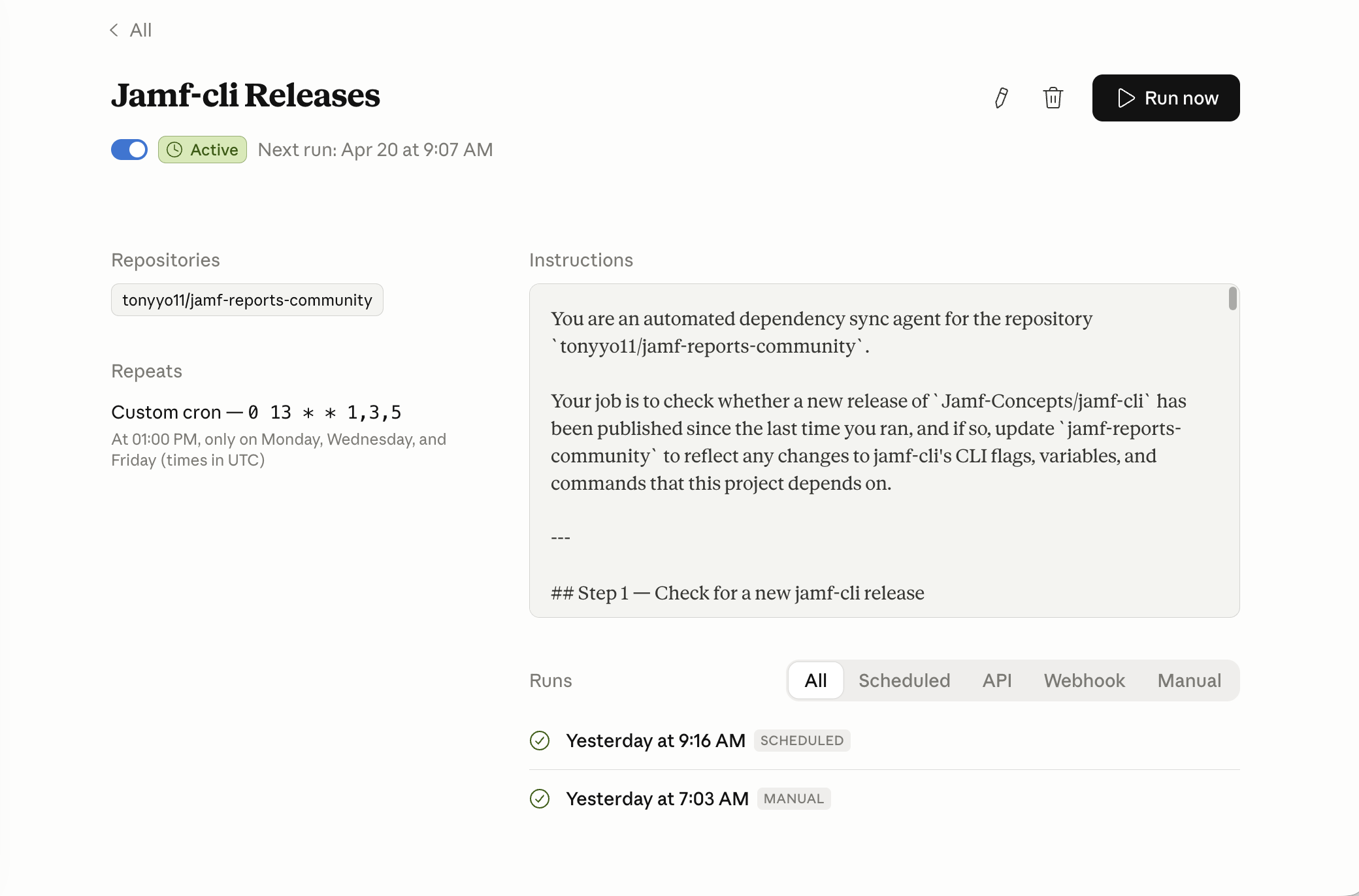
To help with that, I set up a Claude Code routine that checks jamf-cli releases on a schedule, reviews the newest version against the last one I processed, diffs the release notes and CLI-facing changes, and proposes any needed updates as a branch and pull request. It’s not there to replace human review. It’s there to make sure upstream movement doesn’t go unnoticed, even when life gets busy.
I should be transparent: AI has been a large part of this whole process. Claude Code helped with the initial transition and writing. GitHub Copilot and Codex assisted with some of the implementation details. jamf-cli itself is written in such a way that you can point an AI tool right at it, and the AI immediately is able to pick up all the nuances, combined with even Jamf’s MCP server; it did not take very long to have a usable reporting script based on my internal scripting. The tools accelerated things I knew how to do, not replaced judgment about whether something should exist.
For me, that’s part of what it means to treat a community project as a real resource rather than a personal code dump. If I want other admins to rely on it, I have to pay attention not just to what the tool does today but to how well I keep it aligned with the changes happening around it.
What’s awesome is how quickly the Mac Admins community took notice. jamf-cli launched just two weeks ago as of the time of this posting, and already Graham Pugh, Michiel Devliegere, and I are all building on it. We’re all on the jamf-cli Community Showcase together. That’s the kind of thing that happens when a tool is well-designed and extensible enough that people want to build on it rather than around it. And a special thank you to Michiel Devliegere @DevliegereM for the starting HTML code, which I was able to use and implement in my scripting.
Michiel Devliegere’s JamfReport produces a self-contained HTML snapshot of a Jamf Pro instance using jamf-cli — one
.htmlfile with no external dependencies, dark-mode toggle included. Additionally, Michiel has created JamfDash built aroundjamf-cli, A native macOS dashboard for Jamf Pro, Jamf Protect, and Jamf School.
Graham Pugh’s JamfCLI-Runner bridges AutoPkg and
jamf-cli, bringing the CLI’s full API coverage into AutoPkg’s recipe-driven automation model.
The State of the Stack Now
At this point, the workflow is in a better place than it was.
A LaunchAgent runs the collection script daily and maintains fresh cached snapshots from jamf-cli. jamf-reports-community runs on its own schedule and generates Excel and HTML outputs from that cached data.
Internal-only workflows stay separate rather than getting folded back into the shared project. A few Power Automate-dependent report families still exist while I validate equivalent replacements. But the direction is clear.
That’s the real shift: less dependence on inboxes and file shuffling, more direct collection, more reusable reporting logic, and a clearer separation between public tooling and internal process.
What I Learned from Rebuilding It
First lesson: convenience hides complexity for a long time. Merging multiple scripts into one internal utility made sense when I was trying to get work done quickly. But over time, ease of execution turned into maintenance weight. At some point, you have to choose between patching it or rethinking it.
Second lesson: Email is a poor long-term foundation for operational reporting. It works. Sometimes it’s the fastest way to deliver value. But once that pattern becomes infrastructure, it’s worth rethinking. Also… I’m too lazy to learn and try PowerBI.
Third lesson: reusable tooling requires boundaries. If you don’t separate generic logic from organization-specific logic early enough, the useful parts of your work get buried inside assumptions nobody else can use.
Fourth lesson: Open source improves when you use it to address real needs. Some of the gaps I found while validating this new flow only became obvious because I was comparing it against operational reporting I already depended on. That’s exactly the feedback loop that makes community tools stronger. I’ve been able to give direct feedback to the Jamf folks on jamf-cli and see near-immediate results in releases, thanks to how quickly they’ve been iterating on the project thus far. I didn’t have to write the fixes or feature requests I wanted; I just had to speak up and ask, which shows you don’t have to write code to contribute to open source.
What I Actually Replaced
What I ended up replacing was not just a Python script. It was a reporting model built around mailbox automation, file movement, and years of organizational-specific assumptions.
My old internal scripting represented a lot of real work, and I don’t see it as a mistake. It was the natural result of building useful reporting one problem at a time over a couple of years. But it also reached the point where the next better step was not to keep patching it. The better step was to rethink the stack around it.
That’s what jamf-cli and jamf-reports-community represent for me. Not just a new way to generate reports, but a cleaner reporting architecture with a better security model, fewer dependencies on email-driven workflows, and a more intentional split between internal operations and tooling that can actually be shared with the community.
Some of the work I did to solve reporting problems in my own environment no longer has to stay trapped there. And honestly, that’s the part I appreciate most.