Turning Platform SSO Registration from “Optional” into “Operational”
A quick dive into P.S.E.U.D.O., a new open-source tool from Kevin White that helps admins and engineers effectively enforce macOS Platform SSO registration, improving Entra ID and Okta device compliance and Conditional Access deployments more reliably.
Introduction
Platform Single Sign-on (Platform SSO) is one of the more practical identity upgrades Apple has shipped in a while. It connects macOS sign-in to your identity provider more directly, reduces repeated prompts, and makes it easier to build consistent access workflows, whether you’re using Microsoft Entra ID or Okta.
But there’s a catch that anyone who has tried to roll this out at scale already knows: registration is the hard part.
In many environments, Platform SSO registration ends up being “available” rather than “adopted.” Users can delay it, skip it, or never finish it. And if your Conditional Access posture depends on device identity plus compliance, that gap becomes a security and support problem fast.
That’s why P.S.E.U.D.O. is timely.
P.S.E.U.D.O. (Platform SSO Enforcement (of) User Device Onboarding), or just pseudo, is an open-source script by Kevin M. White that’s designed to optimize and enforce the macOS Platform SSO registration experience. This is accomplished by combining swiftDialog, PPPC permissions, and macOS automation frameworks to keep users focused on the registration and completion flows. Kevin, also known as Macjutsu, is also the creator and maintainer of super (sometimes stylized as S.U.P.E.R.M.A.N.)
And because this is hitting right when many of us are expanding and leaning harder into device compliance signals, it lands at exactly the right moment.
What pseudo does
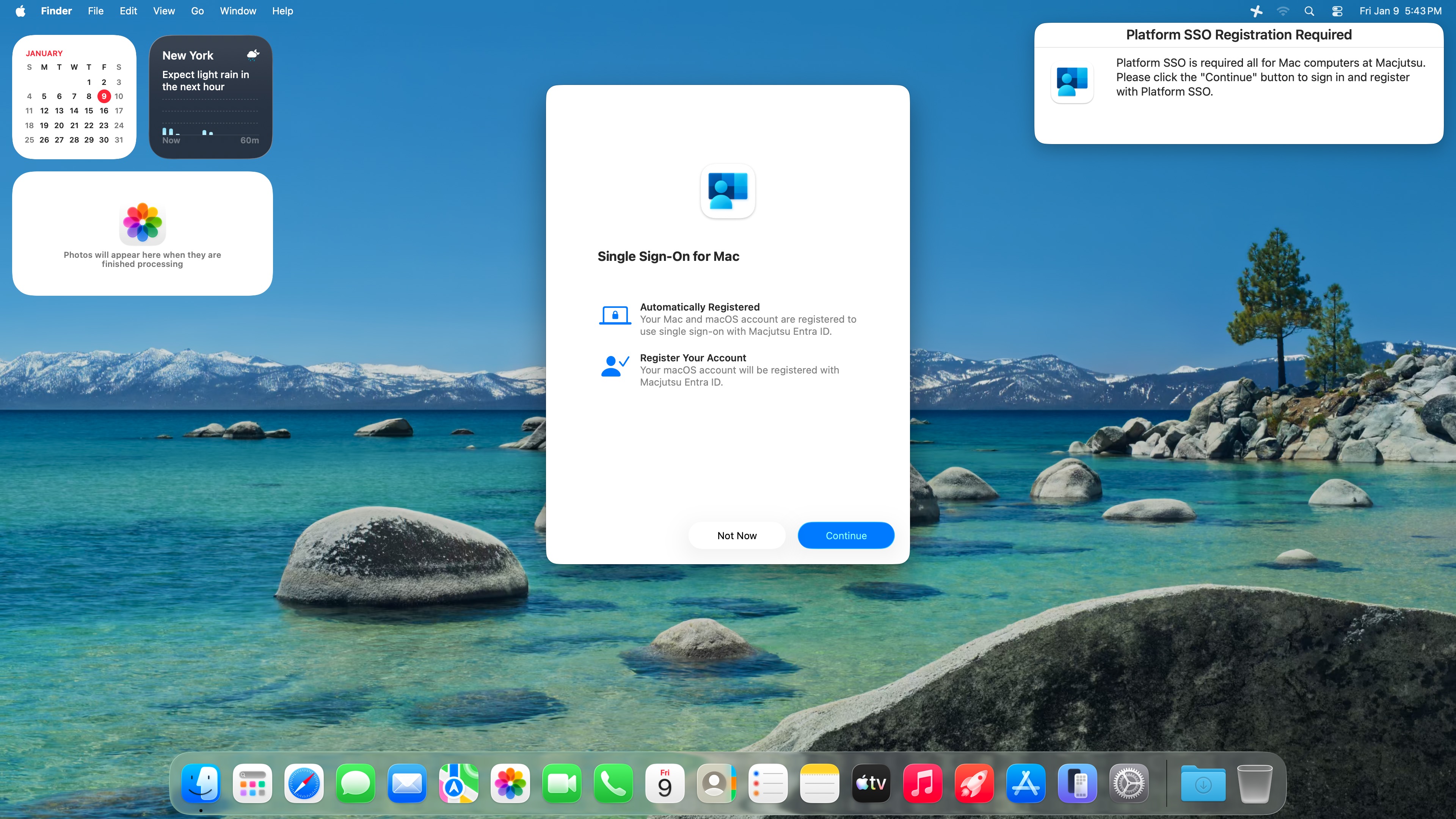
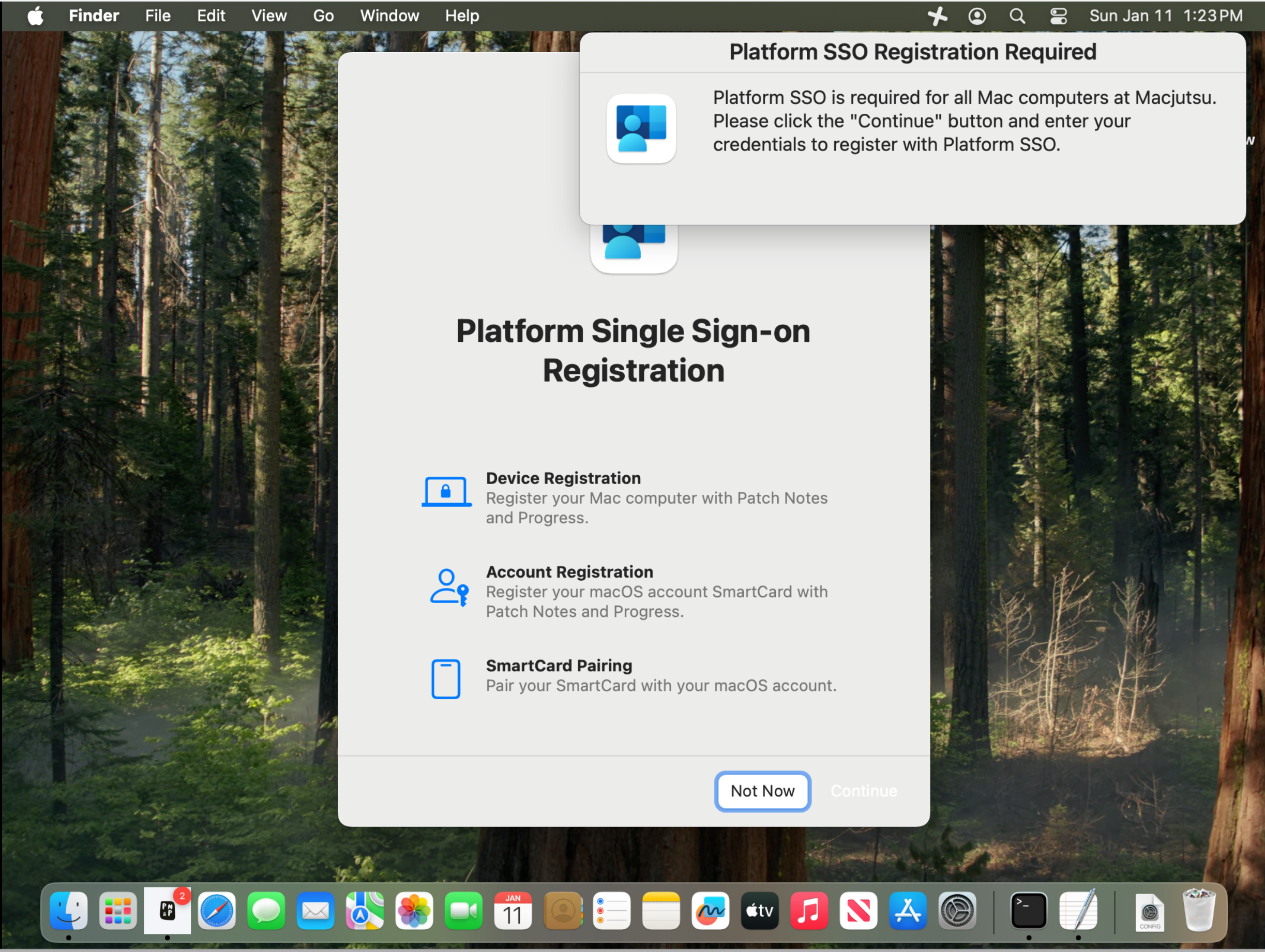
At a high level, pseudo is a “make the right path the easy path” tool. By using built-in frameworks, it presents the right screens and guides users step-by-step until registration is complete.
From the project’s own README:
- It is a single script deployed alongside a required PPPC configuration profile.
- It leverages swiftDialog for user-facing prompts and guidance.
- It uses macOS frameworks like System Events, System Event UI, and Accessibility to bring the correct System Settings panes to the foreground and keep the user on-task until Platform SSO registration is complete (and optionally Touch ID as well).
This matters because Platform SSO can be successfully deployed yet still fail as a program initiative if users don’t complete the final steps. Apple’s Platform SSO workflow includes both device registration and a user authentication step (user registration), depending on how you deploy it.
Why this is timely for Conditional Access and device compliance
The challenge is that registration doesn’t have a native ‘must-enroll by X date’ switch. Without a helper workflow, enforcement tends to happen only when users hit a blocked resource.
In my own organization, we are in the midst of planning out our own rollout of Platform Single Sign-on for macOS with Entra ID. Because the registration process is opt-in, the planned enforcement method was to use Jamf Device Compliance with Entra and “Conditional Access pressure”: block access unless the device is compliant.
We intended to follow Microsoft’s guidance for Jamf-managed Macs and Conditional Access is clear: integrate, define compliance, then enforce access using Entra Conditional Access policies.
That strategy works, but it comes with very real admin pain:
- Users only feel the requirement when they hit a resource and get blocked.
- The help desk gets the first alert, not the admin team.
- The user experience becomes reactive and disruptive.
P.S.E.U.D.O. flips that around.
Instead of waiting for users to run into Conditional Access, you can proactively guide them through the registration experience at your discretion (during onboarding, during a change window, or as part of a campaign).
The evolution I’m working on: Smart card support with Platform SSO
The original pseudo-workflow was designed around Touch ID enablement and Platform SSO enforcement. What makes P.S.E.U.D.O. even more interesting is that the community is already improving it, not just talking about it. Patrick Gallagher, aka patgmac, has a PR in the main project that makes Touch ID optional, which helps the workflow fit more environments. Patrick has also worked to ensure that pseudo functions work properly in environments that use Workspace ONE, not just Jamf Pro. That same “make it work where you are” mindset is what pushed me to start adding smart card support. My fork isn’t just “add smart cards.” The goal is for pseudo to handle Secure Enclave, password, and smart card Platform SSO flows, and to automatically choose the right path by inspecting the Platform SSO configuration profile already deployed on the system.
In my environment, smart cards are part of the reality on the ground. So I forked the project to begin adding support for smart card authentication with Platform SSO, aligning the enforcement flow with how my users are required to authenticate.
So the goal of my fork is straightforward:
- Keep the simplicity and “single script” deployment model.
- Maintain the user-friendly swiftDialog UX.
- Expand the workflow to support Secure Enclave, password, and smart card Platform SSO flows.
- Attempt to automatically detect the enforced method by reading the deployed Platform SSO configuration profile.
Under the hood: swiftDialog 3.0 and why it matters
pseudo relies on swiftDialog because it is one of the best tools we have in the Mac admin community for delivering clear, branded, actionable prompts without building a full app.
It’s important to note that pseudo uses swiftDialog 3.x, which is currently in beta. More importantly, per the swiftDialog 3.0 GitHub entry, it supports only macOS Sequoia 15.x and macOS Tahoe 26.x. macOS Sonoma 14.x and earlier are not supported. I would highly recommend upgrading your Sonoma systems to Sequoia or Tahoe, whichever the individual systems may support.
Impact on Mac administration
Here’s what changes when you add a tool like pseudo into your Platform SSO rollout plan:
1) Registration becomes measurable and repeatable
Platform SSO adoption stops being “we hope they did it” and becomes a campaign you can run, track, and re-run.
2) Help desk load drops
If the workflow guides users at the right time (instead of blocking them mid-day), you reduce “I can’t access Teams/SharePoint/Email” tickets that are really enrollment/compliance problems in disguise.
3) Conditional Access becomes less of a blunt instrument
You can still enforce compliance in Entra Conditional Access (and you should), but now that enforcement is your backstop, not your primary onboarding strategy.
Implementation notes and recommendations
Below is the deployment mindset I’d recommend, based on how pseudo is structured.
Prerequisites to plan for
- PPPC profile: pseudo depends on automation and accessibility capabilities, so treat PPPC as non-negotiable.
- PPPC is required because the script uses Accessibility/System Events to guide System Settings.
- swiftDialog deployment: remember that with swiftDialog 3.0, only macOS 15 and 26 are supported.
- A clear user message: your dialog text should explain “why” in plain language:
- What Platform SSO is doing
- What the user needs to do
- What happens if they skip
Where pseudo fits best
- Existing fleets where you cannot rely on “during enrollment” Platform SSO registration flows (looking at you, on-prem Jamf Pro).
- Organizations that need the user to complete registration before Conditional Access becomes strict.
- Environments where users routinely postpone registration until they get blocked.
- Rollouts with a compliance deadline where help desk load matters.
Conclusion and next steps
Platform SSO is powerful, but power without adoption is just potential energy.
pseudo turns that adoption problem into an actionable workflow: deploy, prompt, guide, verify. It’s the difference between “we enabled Platform SSO” and “we onboarded the fleet.”
My fork exists for one reason: to help bring smart card-friendly enforcement into the same clean workflow Kevin built, so Platform SSO rollouts can succeed in environments that are not Touch ID-first. I plan to continue refining it so I can submit it back to the main project and help Kevin make it a tool that works across all environments and with all authentication methods.
If you’re planning to tighten Conditional Access policies tied to device compliance, this is the kind of tool that can make the difference between a smooth rollout and a month of help desk pain.
Mac Tip of the Day
Before you ever roll out pseudo, you can get ahead of the scoping problem by deploying Kevin’s Jamf Pro Extension Attribute sidekick, Jamf-Pro-EA-PSSO-Users.sh, which is designed to report the Platform SSO registered users back into Jamf inventory.
That gives you a clean way to avoid accidentally re-prompting people who already opted in:
- Add the EA to Jamf Pro and let inventory update for a few days.
- Build a Smart Group for Macs where the EA shows a registered user (or any non-empty result).
- Exclude that Smart Group from your future pseudo policy scope, so only unregistered users get the enforcement prompts.